To see more annotation examples (including how to use geom_text() & geom_label() + the {ggrepel} package to label individual points, how to draw arrows & boxes, etc.), you can check out the archived version of the annotations lecture.
02:00
EDS 240: Lecture 7.2
Annotations
Week 7 | February 18th, 2026
Good data visualization design considers:
This lesson will focus on the use of annotations in a good data visualization.
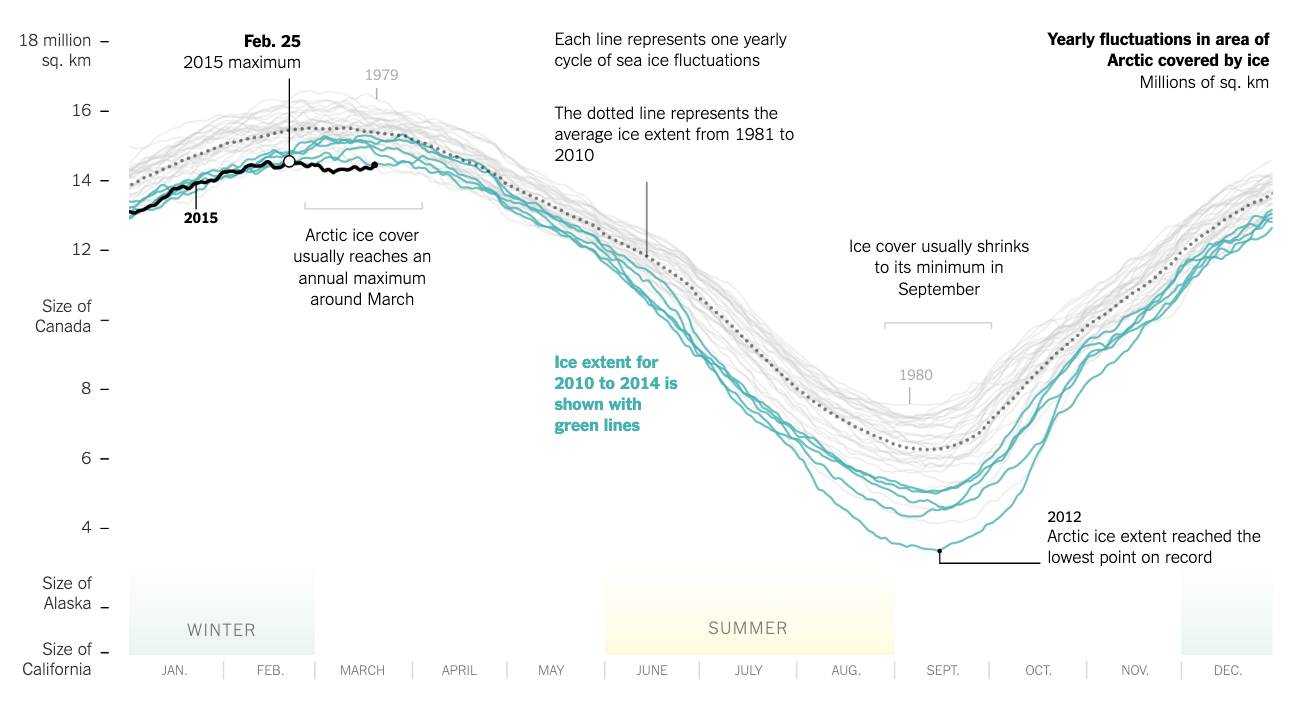
Source: Arctic Ice Reaches a Low Winter Maximum (New York Times).
Also check out this great commentary on the above visualization, Respect your readers’ time (DataWrapper).
Enjoy the y-axis units on this data viz? Be sure to check out The Measure of Things, a search engine for comparative measurements.
02:00


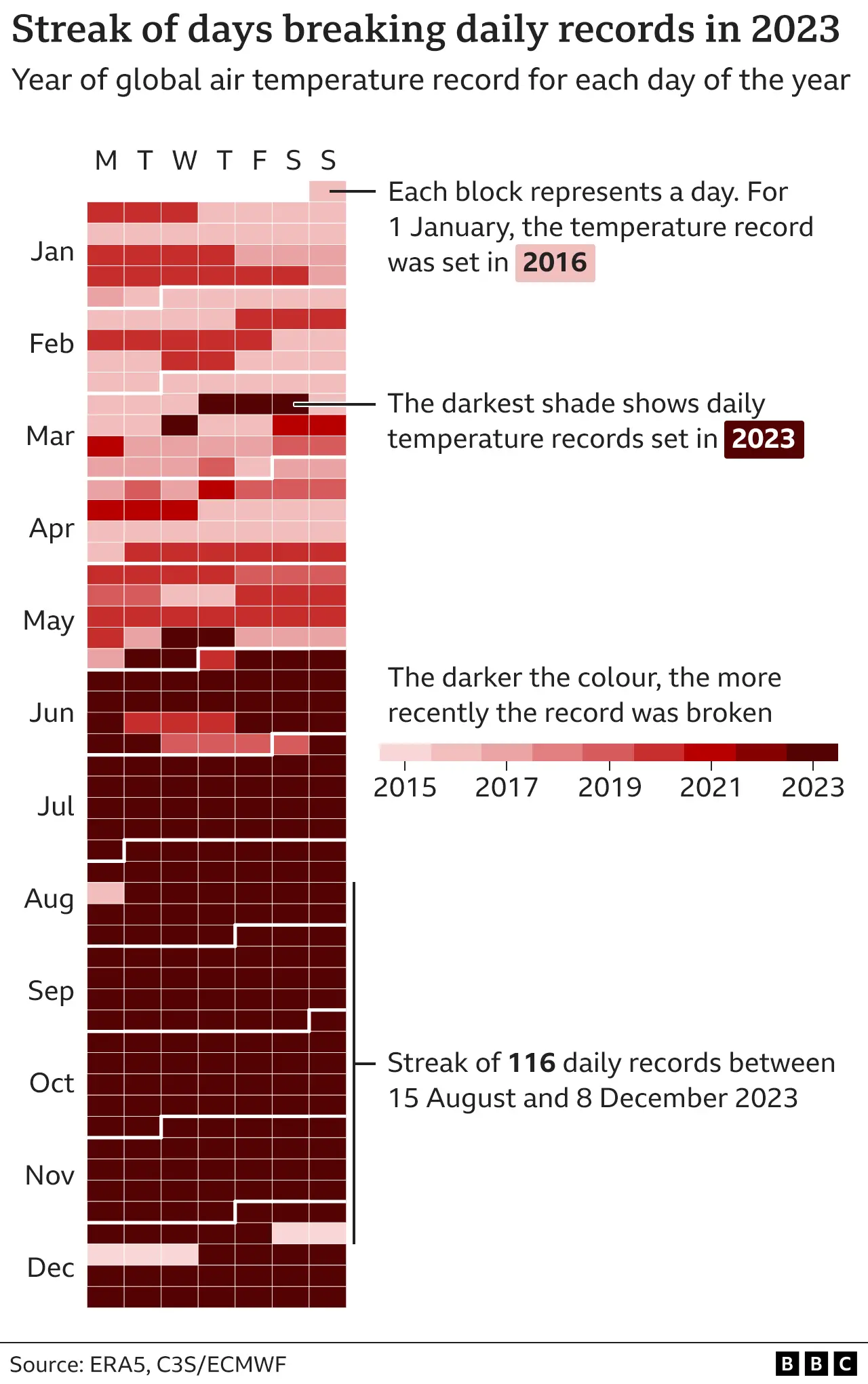
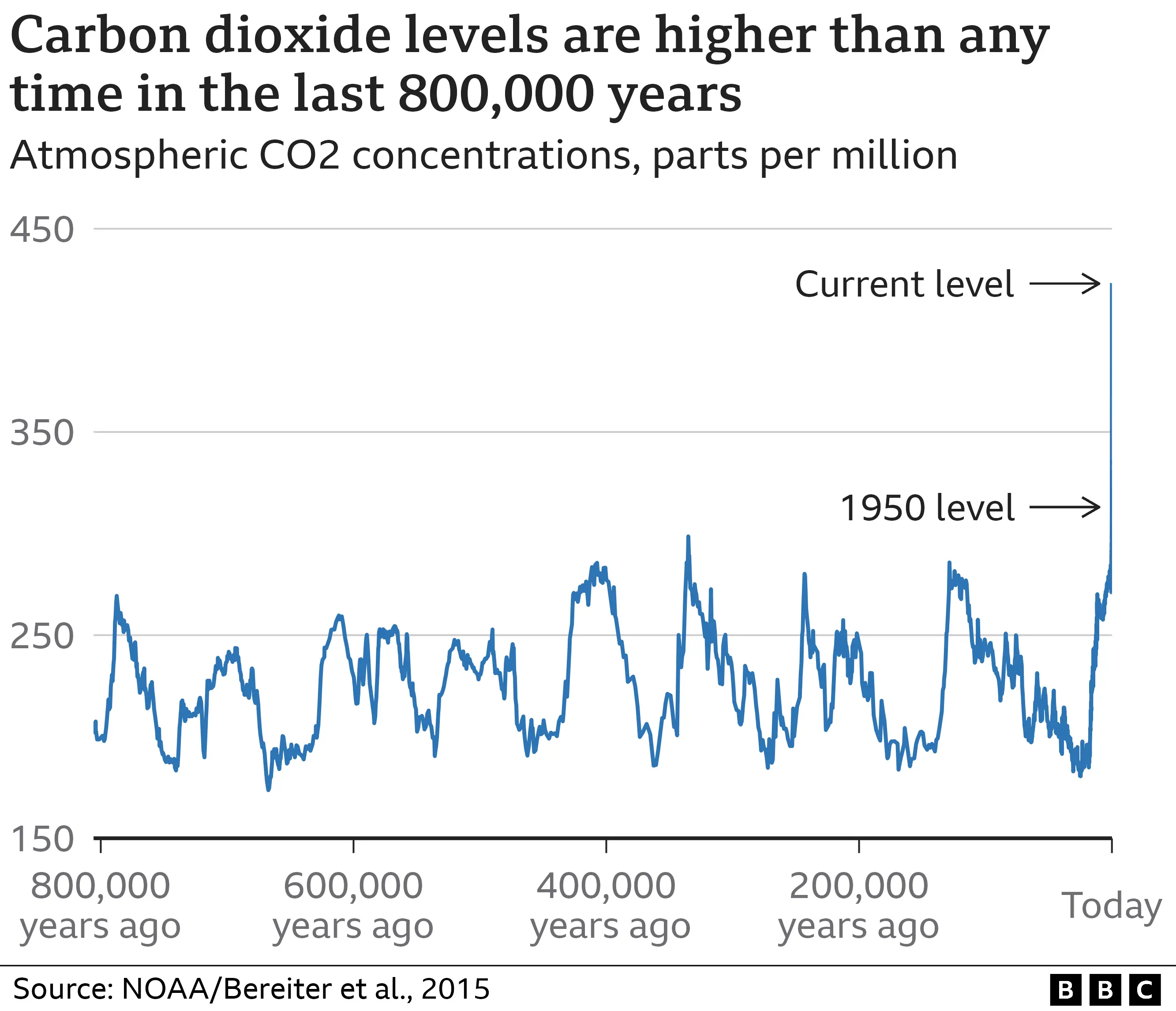
Source: 2023 confirmed as world’s hottest year on record (BBC)
02:00


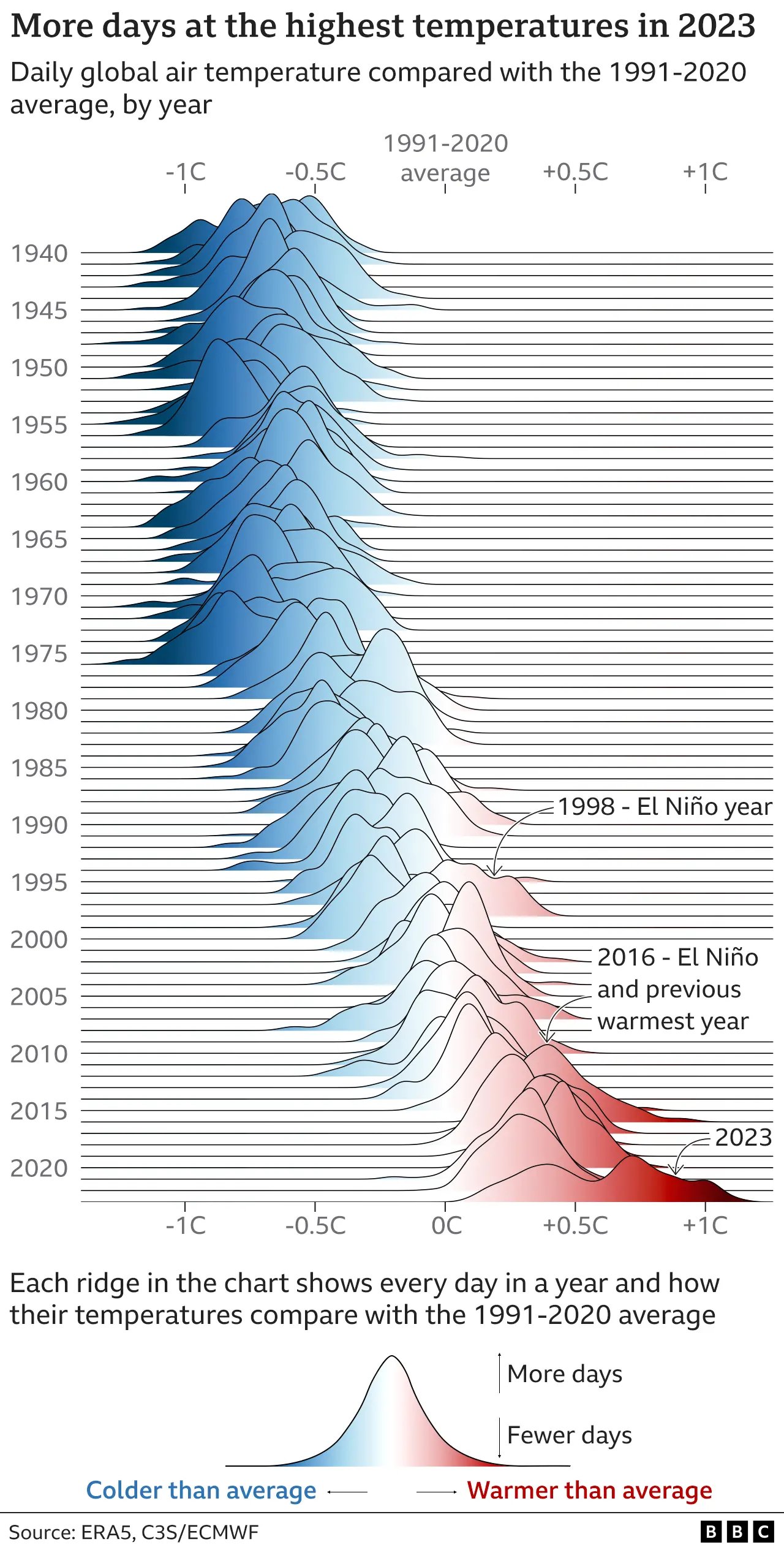
Source: 2023 confirmed as world’s hottest year on record (BBC)
02:00
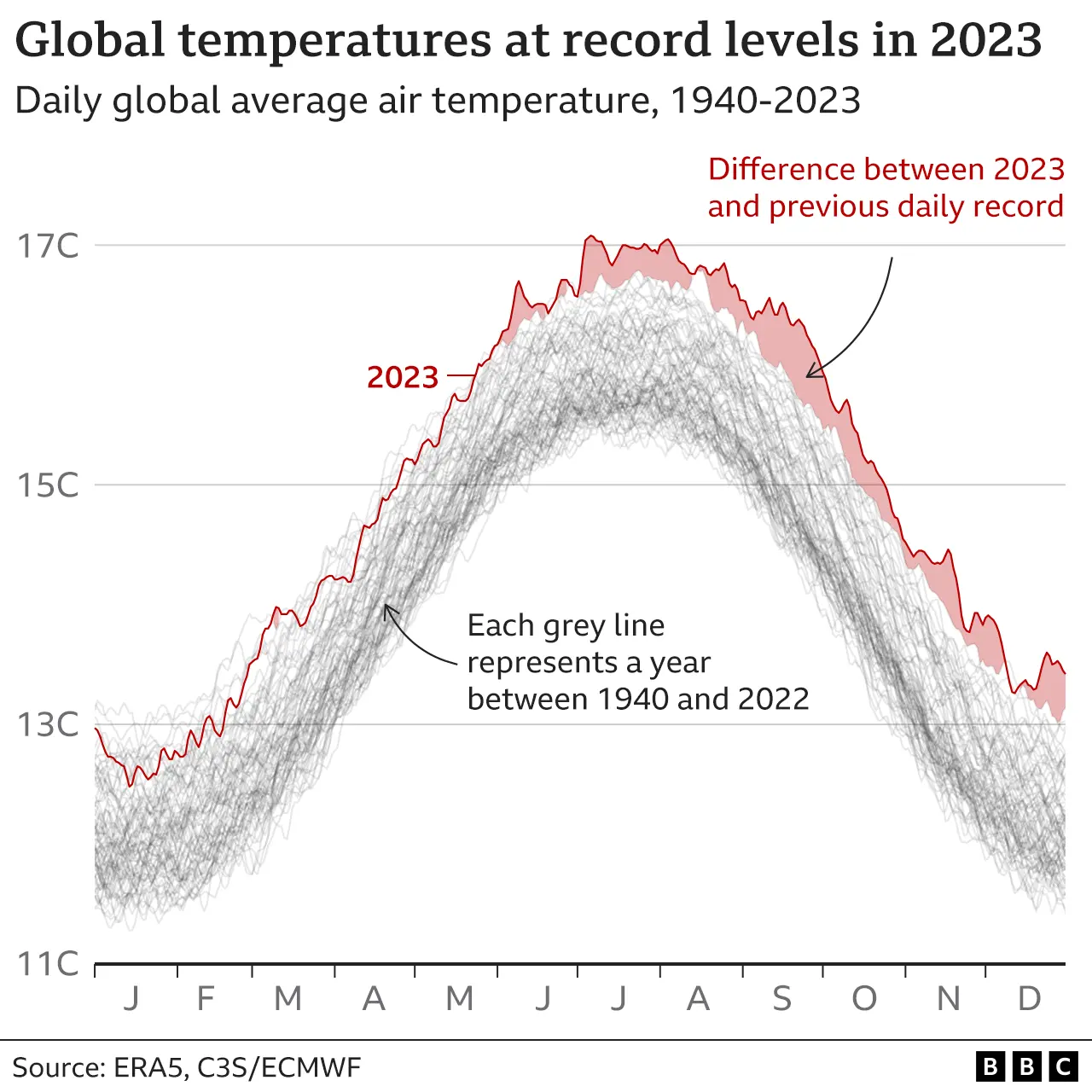
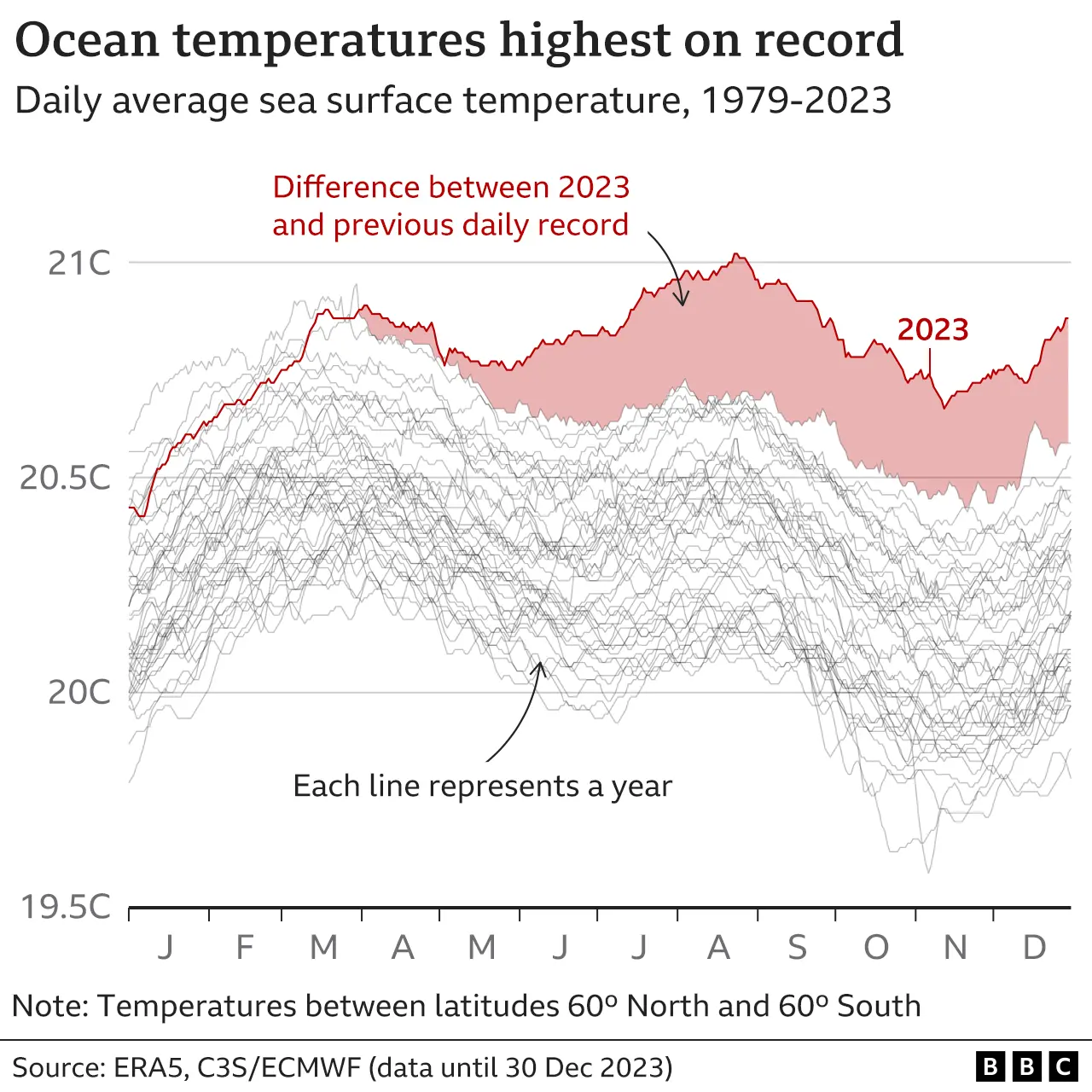
Source: What is climate change? A really simple guide (BBC)
02:00
Why annotate?
The average attention span of an internet user is ~8 seconds (shorter than a goldfish!). It’s imperative that we respect our readers’ time.
Aim to:
The more time you spend making your visualization crystal clear, the more time you save your readers needing to decipher it.
Read these two great posts: What to consider when using text in data visualizations & Respect your readers’ time, both by Lisa Charlotte Muth
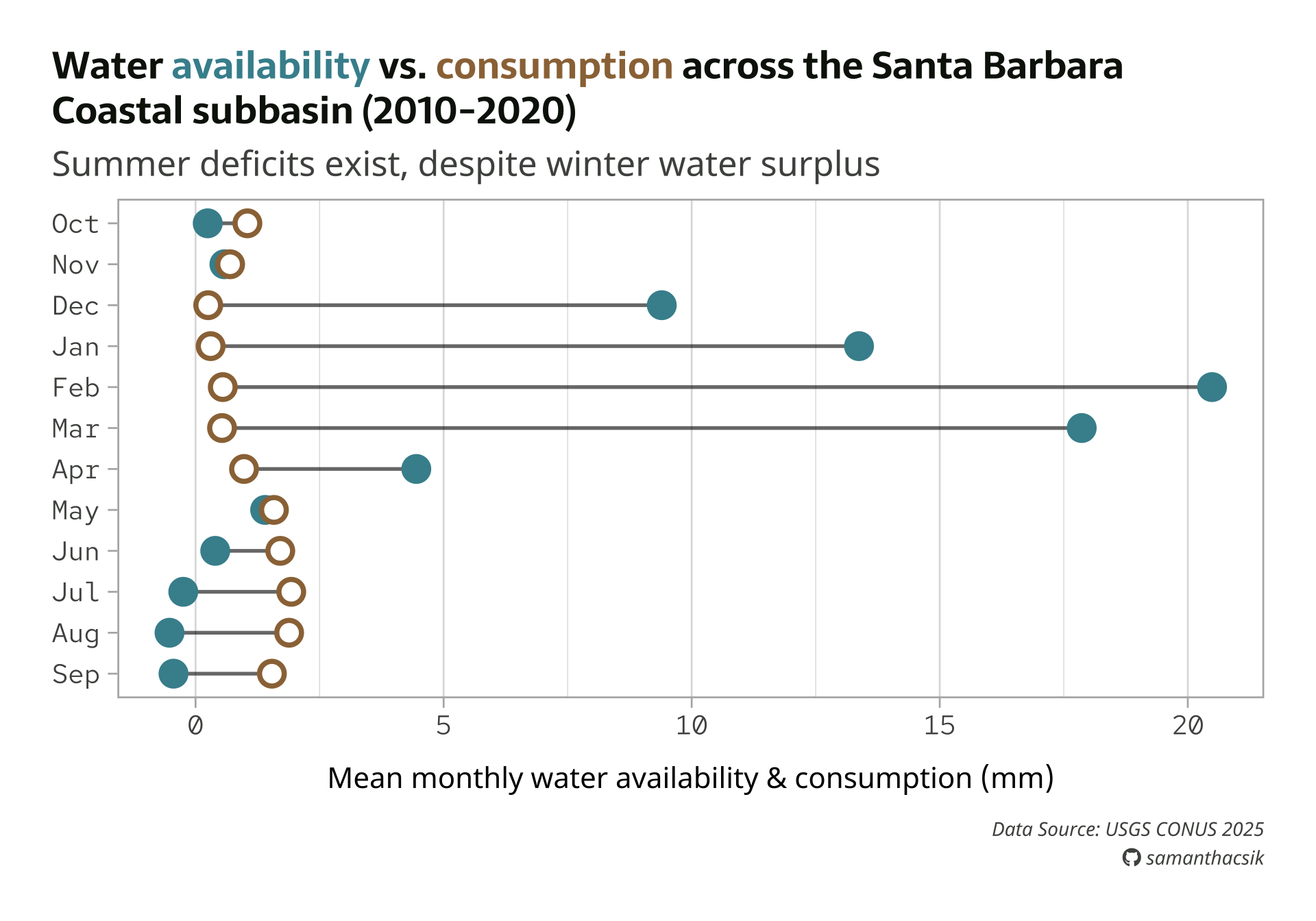
We’ll practice annotating our dumbbell plot
Building custom annotations
There are two primary ways to add custom text annotations:
geom_text() (for plain text) & geom_label() (adds a rectangle behind text), which take aesthetics mappings; these draw the geom once per each row of the data frameannotate(), which does not take aesthetics mappings and instead draws only the information provided to itLet’s try to add an annotation to our plot using both approaches to better understand the difference.
I’ve found the Annotation FAQ super helpful!
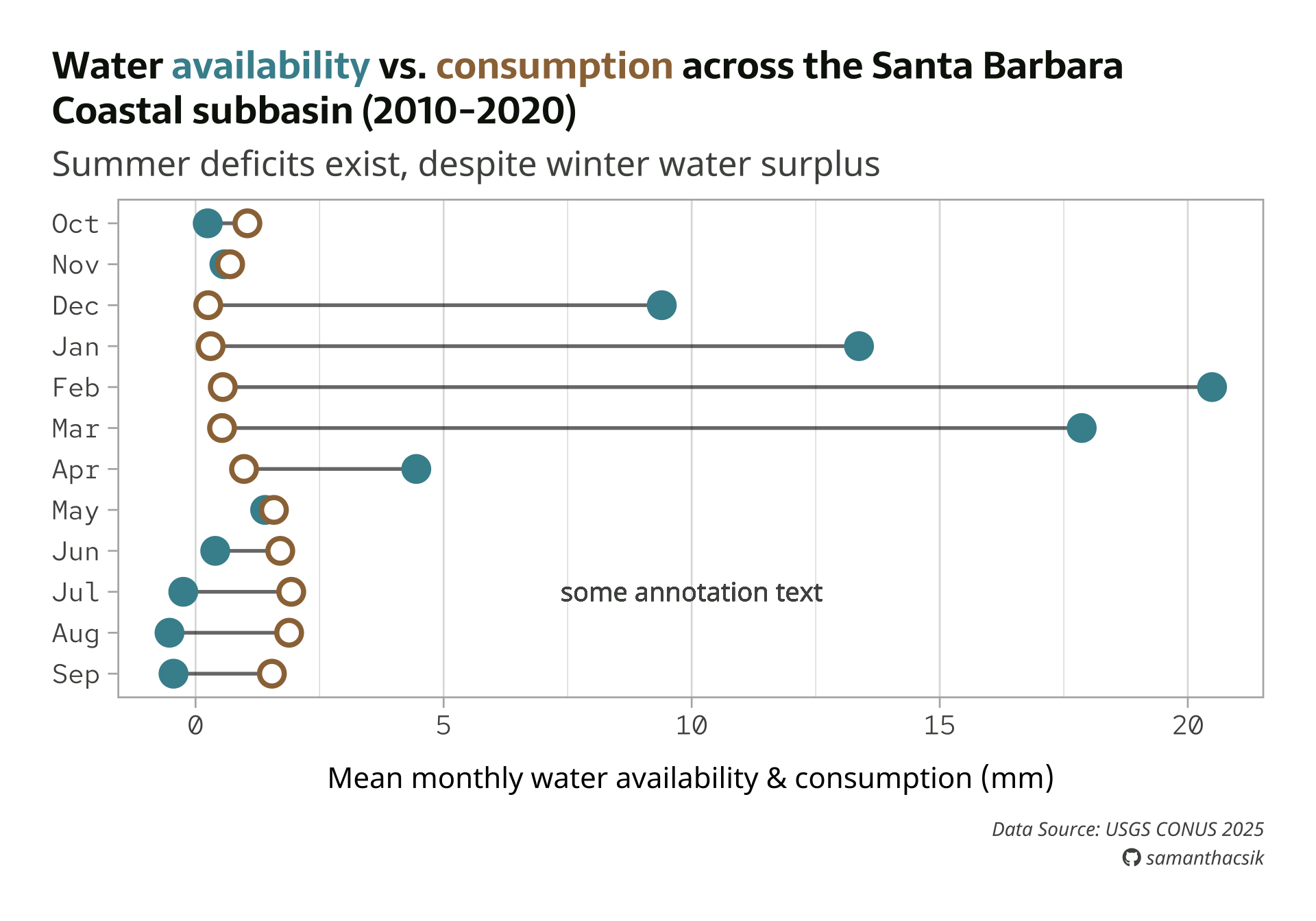
geom_text() doesn’t look right . . .
Here, we use geom_text() to add text to our plot. We need to supply coordinates to place it on our plot. Notice that our text looks oddly blurry and bold…
#..............enable {showtext} for newly opened GD.............
showtext_auto(enable = TRUE)
#...........................build plot...........................
water_plot + # `water_plot` represents all our plot code from the typography lecture
geom_text(
x = 10,
y = 3, # or y = "Jul"
label = "some annotation text",
size = 5,
color = pal["light_gray"],
hjust = "center",
family = "noto-sans"
)
#...............turn off {showtext} text rendering...............
showtext_auto(enable = FALSE)
geom_text() is a data-driven layer
All geom_*()s are data-driven by default. Just like geom_point() will plot a single point for each row in our data frame, geom_text() plots a single label (some annotation text) for each row in our data frame – there are 12 rows in sbc_subbasin_monthly, so our label is plotted 12 times (one on top of the other on our defined x and y coordinates):
tibble [12 × 3] (S3: tbl_df/tbl/data.frame)
$ month : Factor w/ 12 levels "Sep","Aug","Jul",..: 9 8 7 6 5 4 3 2 1 12 ...
$ mean_avail : num [1:12] 13.37 20.49 17.86 4.45 1.4 ...
$ mean_consum: num [1:12] 0.304 0.549 0.533 0.977 1.579 ...
We should instead use annotate() to plot a single text element, independent of our data.
Check out this archived version to see examples of when you might consider using geom_text() (or geom_label()).
Use annotate() to add a single text element
annotate() requires that we define a geom type (e.g. "text", "rect", "curve", "segment").
#..............enable {showtext} for newly opened GD.............
showtext_auto(enable = TRUE)
#...........................build plot...........................
water_plot +
annotate(
geom = "text",
x = 10,
y = 3,
label = "some annotation text",
size = 5,
color = pal["light_gray"],
hjust = "center",
family = "noto-sans"
)
#...............turn off {showtext} text rendering...............
showtext_auto(enable = FALSE)
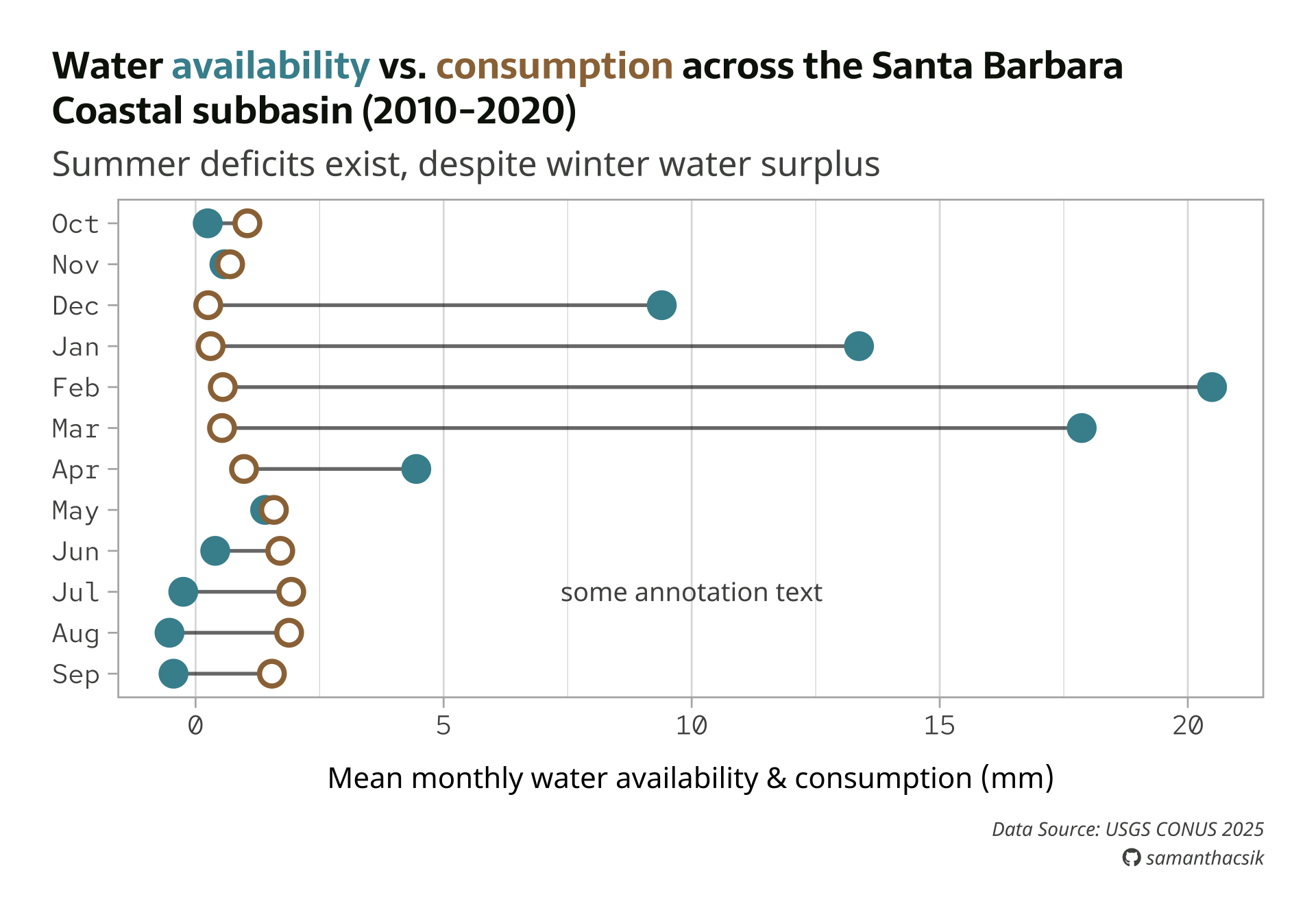
Note: Determining coordinates for any annotation can require a lot of trial and error. Pick values that you think are close and then tweak from there.
Add a more informative annotation
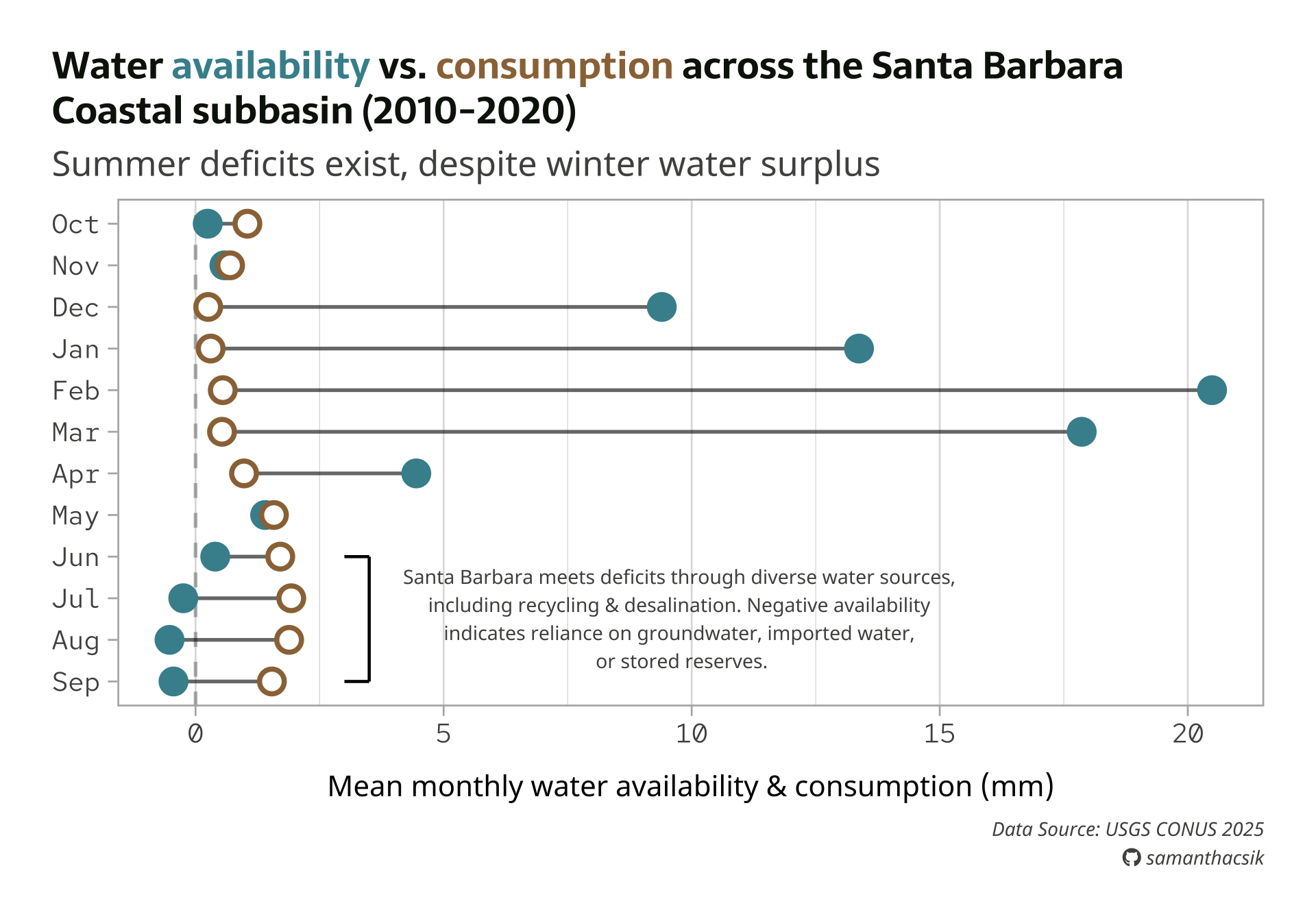
Now that we know the right approach for adding single text elements to our plot, let’s add something a bit more helpful and aesthetic. We’ll construct a bracket to bound the data for Jun > Sep, then add text that describes how Santa Barbara handles water deficits, as well as how to interpret negative availability values. Full plot text is included:
#......................create color palette......................
pal <- c("avail" = "#448F9C",
"consum" = "#9C7344",
"dark_gray" = "#0C1509",
"light_gray" = "#4E514D")
#........................preview palette.........................
# monochromeR::view_palette(pal)
#..........................create title..........................
title <- glue::glue("Water
<span style='color:#448F9C;'>availability</span>
vs.
<span style='color:#9C7344;'>consumption</span>
across the Santa Barbara<br>
Coastal subbasin (2010-2020)")
#.........................create caption.........................
github_icon <- ""
github_username <- "samanthacsik"
caption <- glue::glue(
"Data Source: USGS CONUS 2025<br>
<span style='font-family:fa-brands;'>{github_icon};</span>
{github_username}"
)
#........................create annotation.......................
annotation <- glue::glue(
"Santa Barbara meets deficits through diverse water sources,
including recycling & desalination. Negative availability
indicates reliance on groundwater, imported water,
or stored reserves."
)
#..............enable {showtext} for newly opened GD.............
showtext_auto(enable = TRUE)
#...........................build plot...........................
water_plot <- ggplot(sbc_subbasin_monthly) +
geom_vline(xintercept = 0,
linetype = "dashed",
color = pal["light_gray"],
alpha = 0.4) +
geom_linerange(aes(y = month,
xmin = mean_consum, xmax = mean_avail),
alpha = 0.6) +
geom_point(aes(x = mean_avail, y = month),
color = pal["avail"],
size = 5,
stroke = 2) +
geom_point(aes(x = mean_consum, y = month),
color = pal["consum"],
fill = "white",
shape = 21,
size = 5,
stroke = 2) +
annotate("segment",
x = 3.5, xend = 3.5,
y = 4, yend = 1, # or y = "Jun", yend = "Sep"
linewidth = 0.8) +
annotate("segment",
x = 3.5, xend = 3,
y = 4, yend = 4,
linewidth = 0.8) +
annotate("segment",
x = 3.5, xend = 3,
y = 1, yend = 1,
linewidth = 0.8) +
annotate(geom = "text",
x = 12,
y = 2.5,
label = annotation,
size = 3.5,
color = pal["light_gray"],
hjust = "center",
family = "noto-sans") +
labs(title = title,
subtitle = "Summer deficits exist, despite winter water surplus",
caption = caption,
x = "Mean monthly water availability & consumption (mm)") +
theme_light(base_size = 17) +
theme(
plot.title.position = "plot",
plot.title = ggtext::element_markdown(family = "sarala",
face = "bold",
size = rel(0.98),
lineheight = 1.2,
color = pal["dark_gray"]),
plot.subtitle = element_text(family = "noto-sans",
size = rel(0.9),
color = pal["light_gray"],
margin = margin(b = 8)),
axis.text = element_text(family = "red",
size = rel(0.7),
color = pal["light_gray"],),
axis.title.x = element_text(family = "noto-sans",
size = rel(0.75),
margin = margin(t = 15)),
axis.title.y = element_blank(),
plot.caption = ggtext::element_markdown(family = "noto-sans",
face = "italic",
size = rel(0.5),
color = pal["light_gray"],
halign = 1,
lineheight = 1.5),
panel.grid.major.y = element_blank(),
plot.margin = margin(t = 1, r = 1, b = 1, l = 1, "cm")
)
water_plot
#...............turn off {showtext} text rendering...............
showtext_auto(enable = FALSE)Learn more about Santa Barbara’s diverse water portfolio.
We can use ggsave() to save our plot as a PNG file
ggsave() creates a new graphical device (here, we specify a PNG device) to write the output file. By default, {showtext} uses a resolution of 96 DPI (dots per inch) when rendering our plot on screen, while ggsave() uses a default resolution of 300 DPI to write our plot to file. Ensure these match to avoid inconsistent font renderings across devices.
#..............enable {showtext} for newly opened GD.............
showtext_auto(enable = TRUE)
#...................set resolution to match GD...................
showtext_opts(dpi = 300)
#..............write plot to file (aka save as png)..............
ggsave(
filename = here::here("week7", "images", "sbc-hydro.png"),
plot = water_plot,
device = "png",
width = 8,
height = 7,
unit = "in",
dpi = 300
)
#...............turn off {showtext} text rendering...............
showtext_auto(enable = FALSE)You may need to make adjustments, depending on size
Depending on your saved image dimensions, you may need to update your base font size, elements with absolute sizes (e.g. point sizes), or shift elements (e.g. adjust your caption location).
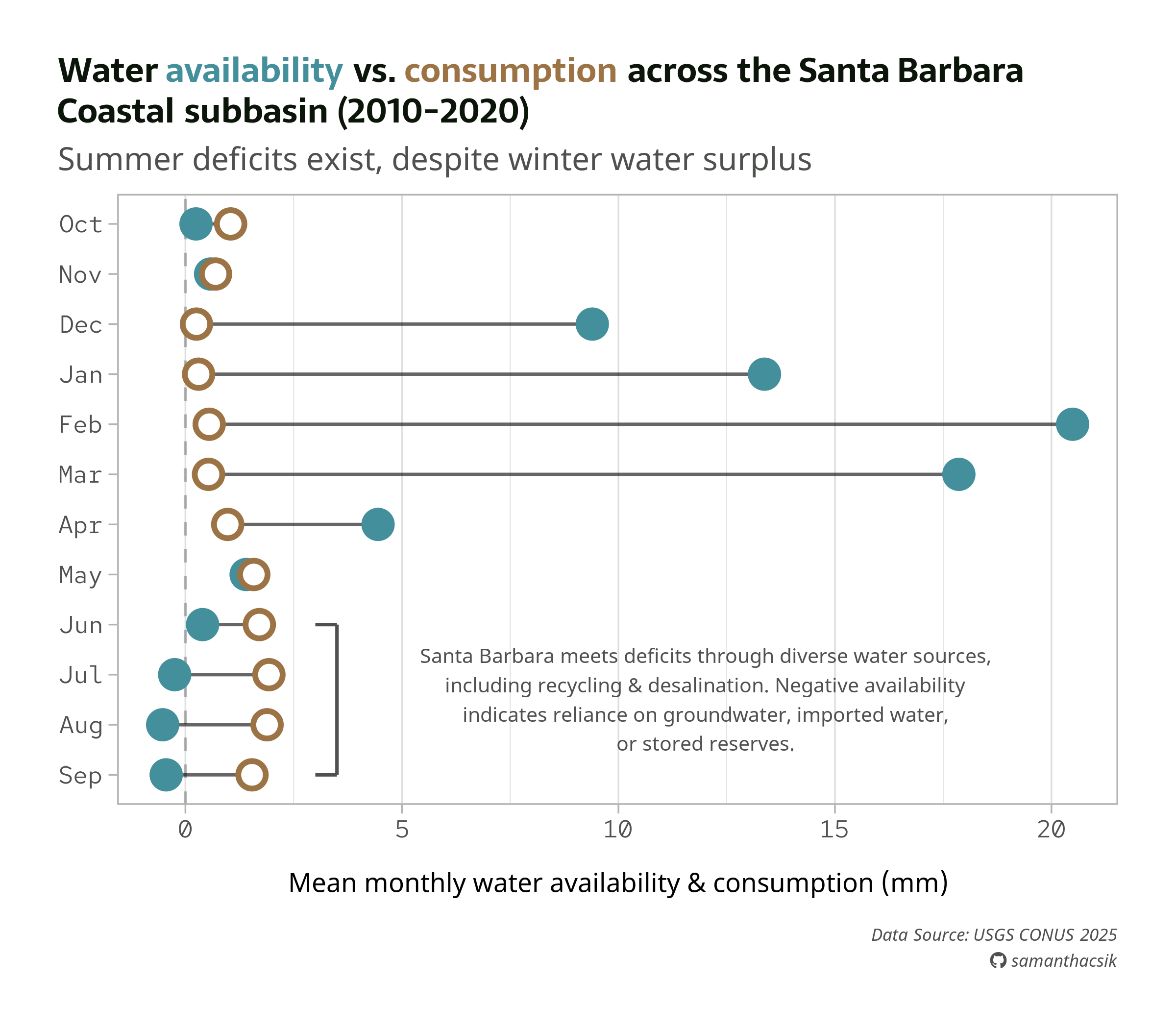
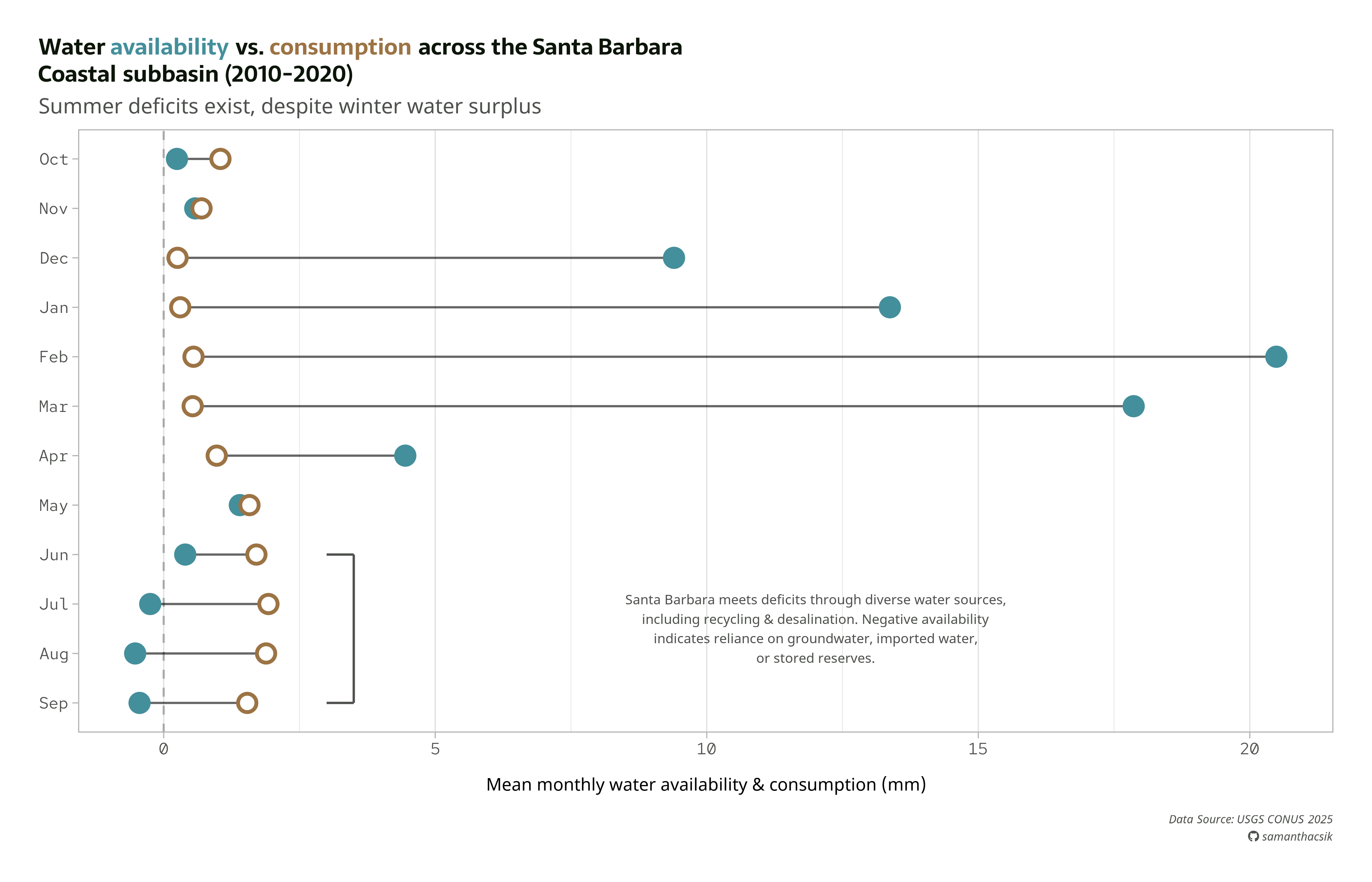
Left: 8x7”, 300dpi PNG file | Right: 14x9”, 300dpi PNG file
Looking for more annotation examples?
To see more annotation examples (including how to use geom_text() & geom_label() + the {ggrepel} package to label individual points, how to draw arrows & boxes, etc.), you can check out the archived version of the annotations lecture.
Take a Break
05:00