##~~~~~~~~~~~~~~~~~~~~~~~~~~~~~~~~~~~~~~~~~~~~~~~~~~~~~~~~~~~~~~~~~~~~~~~~~~~~~~
##                                    setup                                 ----
##~~~~~~~~~~~~~~~~~~~~~~~~~~~~~~~~~~~~~~~~~~~~~~~~~~~~~~~~~~~~~~~~~~~~~~~~~~~~~~

#..........................load packages.........................
library(tidyverse)

#..........................import data...........................

# data preprocessing
drought <- read_csv(here::here("week3", "data", "drought.csv"))

##~~~~~~~~~~~~~~~~~~~~~~~~~~~~~~~~~~~~~~~~~~~~~~~~~~~~~~~~~~~~~~~~~~~~~~~~~~~~~~
##                            wrangle drought data                          ----
##~~~~~~~~~~~~~~~~~~~~~~~~~~~~~~~~~~~~~~~~~~~~~~~~~~~~~~~~~~~~~~~~~~~~~~~~~~~~~~

drought_clean <- drought |>

  # Pivot table to be in tidy form
  pivot_longer(cols = None:D4, names_to = "drought_lvl", values_to = "area_pct") |>

  janitor::clean_names() |>

  # Rename state abbreviation column
   rename(state_abb = state_abbreviation) |>


  # select cols of interest & update names for clarity (as needed) ----
  select(date = valid_start, state_abb, drought_lvl, area_pct) |>

  # add year, month & day cols using {lubridate} fxns ----
  # NOTE: this step isn't necessary for our plot, but I'm including as examples of how to extract different date elements from a object of class Date using {lubridate} ----
  mutate(year = year(date),
         month = month(date, label = TRUE, abbr = TRUE),
         day = day(date)) |>

  # add drought level conditions names ----
  mutate(drought_lvl_long = factor(drought_lvl,
                            levels = c("D4", "D3", "D2", "D1","D0", "None"),
                            labels = c("D4 (Exceptional)", "(D3) Extreme",
                                       "D2 (Severe)", "D1 (Moderate)",
                                       "D0 (Abnormaly Dry)",
                                       "No Drought"))) |>

  # reorder cols ----
  relocate(date, year, month, day, state_abb, drought_lvl, drought_lvl_long, area_pct)

##~~~~~~~~~~~~~~~~~~~~~~~~~~~~~~~~~~~~~~~~~~~~~~~~~~~~~~~~~~~~~~~~~~~~~~~~~~~~~~
##       create stacked area plot of CA drought conditions through time     ----
##~~~~~~~~~~~~~~~~~~~~~~~~~~~~~~~~~~~~~~~~~~~~~~~~~~~~~~~~~~~~~~~~~~~~~~~~~~~~~~
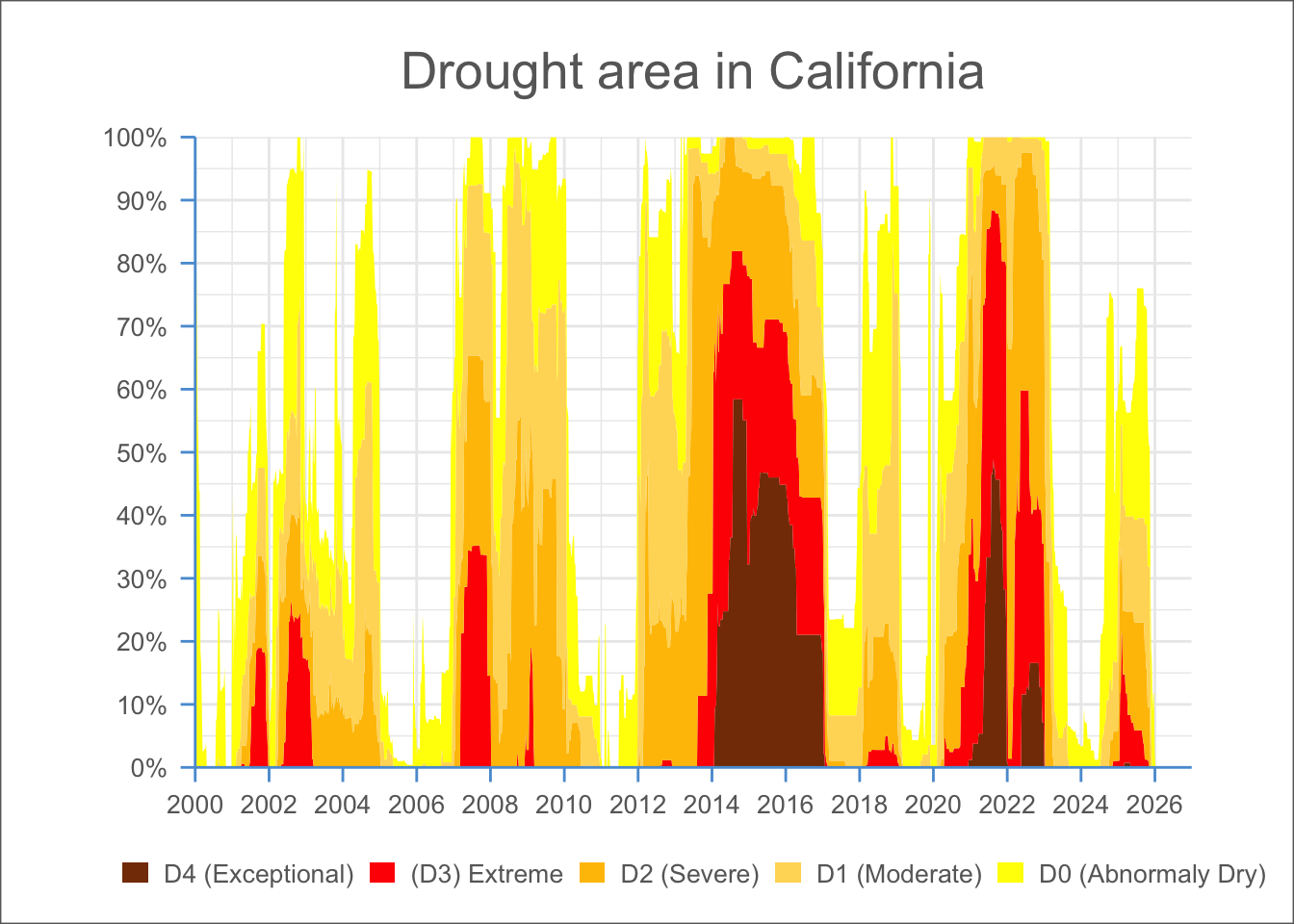
drought_clean |>

  # remove drought_lvl "None" & filter for just CA ----
  filter(drought_lvl != "None",
         state_abb == "CA") |>

  # initialize ggplot ----
  ggplot(mapping = aes(x = date, y = area_pct, fill = drought_lvl_long)) +

  # reverse order of groups so level D4 is closest to x-axis ----
  geom_area(position = position_stack(reverse = TRUE)) +

  # update colors to match US Drought Monitor ----
  # (colors identified using ColorPick Eyedropper extension on the original USDM data viz)
  scale_fill_manual(values = c("#853904", "#FF0000", "#FFC100", "#FFD965", "#FFFF00")) +

  # set x-axis breaks & remove padding between data and x-axis ----
  scale_x_date(breaks = scales::breaks_pretty(n = 13),
                limits = as.Date(c("2000-01-01", "2026-12-31")),
               expand = c(0,0)) +

  # set y-axis breaks & remove padding between data and y-axis & convert values to percentages ----
  scale_y_continuous(breaks = seq(0, 100, by = 10),
                     expand = c(0, 0),
                     labels = scales::label_percent(scale = 1)) +

  # add title ----
  labs(title = "Drought area in California") +

##~~~~~~~~~~~~~~~~~~~~~~~~~~~~~~~~~~~~~~~~~~~~~~~~~~~~~~~~~~~~~~~~~~~~~~~~~~~~~~
##                                                                            --
##-------------------------  THEME CODE!-----------------------------
##                                                                            --
##~~~~~~~~~~~~~~~~~~~~~~~~~~~~~~~~~~~~~~~~~~~~~~~~~~~~~~~~~~~~~~~~~~~~~~~~~~~~~~

  # set theme minimal (includes major/minor grid lines, no axes) ----
  theme_minimal() +

  # fine-tune adjustments to plot theme ----
  theme(

    # update axis lines & ticks color ----
    axis.line = element_line(color = "#5A9CD6"),
    axis.ticks = element_line(color = "#5A9CD6"),

    # adjust length of axis ticks ----
    axis.ticks.length = unit(.2, "cm"),

    # center plot title ----
    plot.title = element_text(hjust = 0.5, color = "#686868", size = 20,
                              margin = margin(t = 10, r = 0, b = 15, l = 0)),

    # remove axis & legend titles ----
    axis.title = element_blank(),
    legend.title = element_blank(),

    # axis text color & size ----
    axis.text = element_text(color = "#686868", size = 10),
    legend.text = element_text(color = "#686868", size = 10),

    # move legend below plot ----
    legend.position = "bottom",
    legend.direction = "horizontal",
    legend.key.width = unit(0.4, "cm"),
    legend.key.height = unit(0.25, "cm"),

    plot.background = element_rect(color = "#686868"),
    plot.margin = margin(t = 10, r = 40, b = 10, l = 40)
  )